Well, I caved and bought it digitally... not quite sure if I regret it yet
Never known a game that requires so much messing around just to get it to look/run somewhat smoothly. None of the advice I found online quite suited my taste, so I ended up going back and forth adjusting everything to my own liking, but the graphics still look kinda dogsh!t and I either have to have it super bright so I can see in the dark, or have it super dark so that it doesn't blind me.....there's no in between. As I was warned, the controls are really finicky and clunky, even more-so than I expected. There's loads of different button combos to remember for certain abilities etc as well, so I'm probably gonna forget half of them and therefore just not use them lol.
I've only just got to the point in the story where you get your wings anyway, so still very early days. Hopefully I can get passed the way it looks/run and adapt to the controls so that I can at least enjoy exploring.

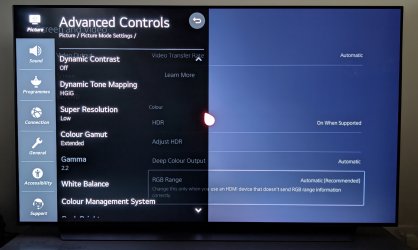
If this helps.
My Game settings for an LG OLED CX
My LG OLED Game TV settings with VRR
Hope this is useful dude.
BTW. If you're using HDR, have you set it first in PS5 video screen settings?
Must do that first and THEN set the in game HDR filter.
Attachments
Last edited:






 . I don't even really know what HDR is/does. Not to mention my TV has a 'Game Optimiser' setting which throws another spanner in the works... I turned it off because again, I don't understand it and it didn't seem to make a difference to me anyway lol.